Frontend Performance: Best Practices and Practical Tips
A visually appealing software is only half the battle — its performance is what truly defines the user experience.
This article dives into a collection of practical yet often overlooked strategies that can significantly boost your website’s performance.
1. General Frontend Optimizations
The Browser Role (Critical Rendering Path)
We often focus solely on what we, as website owners and web developers, should do.
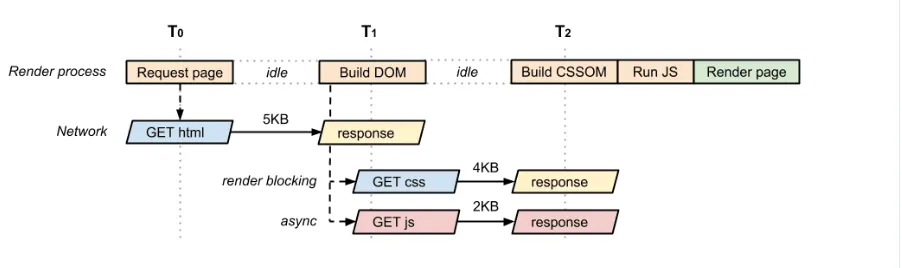
But the truth is: delivering a fast web experience also requires a lot of work by the browser — how it receives our HTML, CSS, and JavaScript files and takes specific steps to convert them into pixels on the screen.
Optimizing the critical rendering path improves load time and reduces perceived delays.
Here is a simplified illustration of the render process steps:
This topic is out of the scope of this article, but I recommend these resources for more details:
- Ilya Grigorik — Critical Rendering Path: Crash Course on Web Performance
- Ilya Grigorik — Analyzing Critical Rendering Path Performance
Minimize iFrames Usage
- iFrames are bad for performance and are not indexed by search engines.
- Use iFrames only if you don’t have any other technical possibility.
Image Optimization
- Compress Images: Use tools like Squoosh or Compressor.io and aim for a compression level below 85% and less than 200kb (exceptions apply for high-resolution displays).
- Lazy Loading / Preloading: Lazyload offscreen images to reduce initial load time, and preload images for the landing section.
- Use Modern Formats: Prefer WebP over JPEG or PNG for better compression and quality.
- Define Image Dimensions: Specify width and height for each image to avoid layout shifts.
Minify JavaScript and Bundle Size
- Dynamic Imports: Split code into smaller bundles to reduce initial load time.
- Tree Shaking: Remove unused code from the final bundle using build tools.
- Analyze Bundles: Use tools like Webpack Bundle Analyzer or Source Map Explorer to identify large dependencies.
- Choose Dependencies Wisely: Evaluate libraries by size and functionality using BundlePhobia or NPM Trends.
Debouncing and Throttling
- Utilize these techniques with search requests or event handlers like
scrollorresizeto prevent unnecessary function calls.
2. React Ecosystem Optimizations
Efficient List Rendering
- Avoid extra reconciliation: use unique keys to help React update the DOM efficiently.
- For large lists, render only visible portions using libraries like
react-windoworreact-virtualized. - Be mindful of dependencies inside
useEffect,useMemo, anduseCallback.
Optimize State Management
- Avoid deep state trees and prop drilling, which can trigger unnecessary global rerenders.
- State declaration rules:
- Keep state local when possible
- Lift state up (parent → children)
- Callback state (child → parent)
- Global state (for complex scenarios)
Utilize Caching
- Cache API Responses: Avoid unnecessary fetch requests and improve UX with smoother navigation.
Depending on your priorities, you can opt for:
- Automatic Caching: Handled by libraries like TanStack Query, RTK Query, or
axios-cache-interceptor. - Manual Caching: Implement caching logic yourself using
localStorage,sessionStorage, or Redux.
3. Specific Use Case Scenarios
Large Number of Viewport Elements
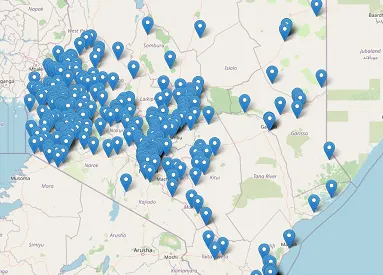
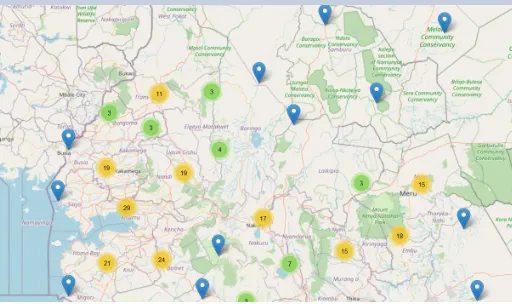
- Rendering many markers on a map or avatars in a Figma-like playground can be expensive and clutter the UI.
- Solution: Use the "cluster technique" to group nearby elements into a single marker, dynamically adjusting based on zoom level or viewport.
Charts Optimizations
-
Smoothing Data: Techniques like clustering or random downsampling reduce chart points but can distort trends.
-
Use smoothing algorithms such as SMA, ASAP, and LTD to preserve chart shape and performance.
-
Render Charts on View: Avoid rendering charts during initial page load to prevent freezing. Only render charts when they appear in the viewport.
Dealing with Animations
- Prefer CSS animations over JavaScript.
- Animate light properties like
scaleandtransformrather than heavy properties likewidth,height,margin, andpadding. - Avoid animation loops, especially on mobile. Stop loops when elements are out of view.
4. You Can’t Optimize What You Don’t Measure
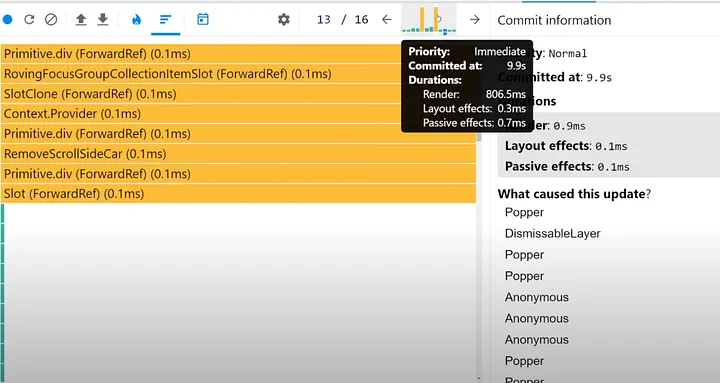
- React Profiler: Helps you measure the rendering performance of a React tree programmatically, and find which elements are blocking or freezing your actions in the web
- Lighthouse: Provides webpage performance insights. Scores include:
- First Contentful Paint (FCP)
- Largest Contentful Paint (LCP)
- Time to Interactive (TTI)
- Cumulative Layout Shift (CLS)
More details: Philip Walton — Web Vitals
Conclusion
While these tips focus on JavaScript and the React ecosystem, the principles apply across all front-end technologies:
- Clean architecture
- Bundle size and image optimizations
- Caching
- Monitoring performance
Remember: Performance isn’t optional — it’s essential for keeping users engaged and satisfied.